Copilot can now reason over Dynamics 365 and Power Apps data in preview. What changes, the admin controls and a 7-step plan to pilot it with control.
TL;DR: Microsoft 365 Copilot can now reason over your Dynamics 365 Sales, Dynamics 365 Customer Service and Power Apps data, in public preview, through Business Applications in Work IQ. Nothing flows until admins switch it on in two admin centers. Use the preview window to fix security roles, scope a pilot group and set a credits policy before usage-based billing becomes the default for new Copilot Business licenses between January and March 2027.
Updated November 14, 2026: Microsoft moved the usage-based billing default for new Copilot Business licenses bought through partners from December 1, 2026 to January to March 2027. This article reflects the new timing.
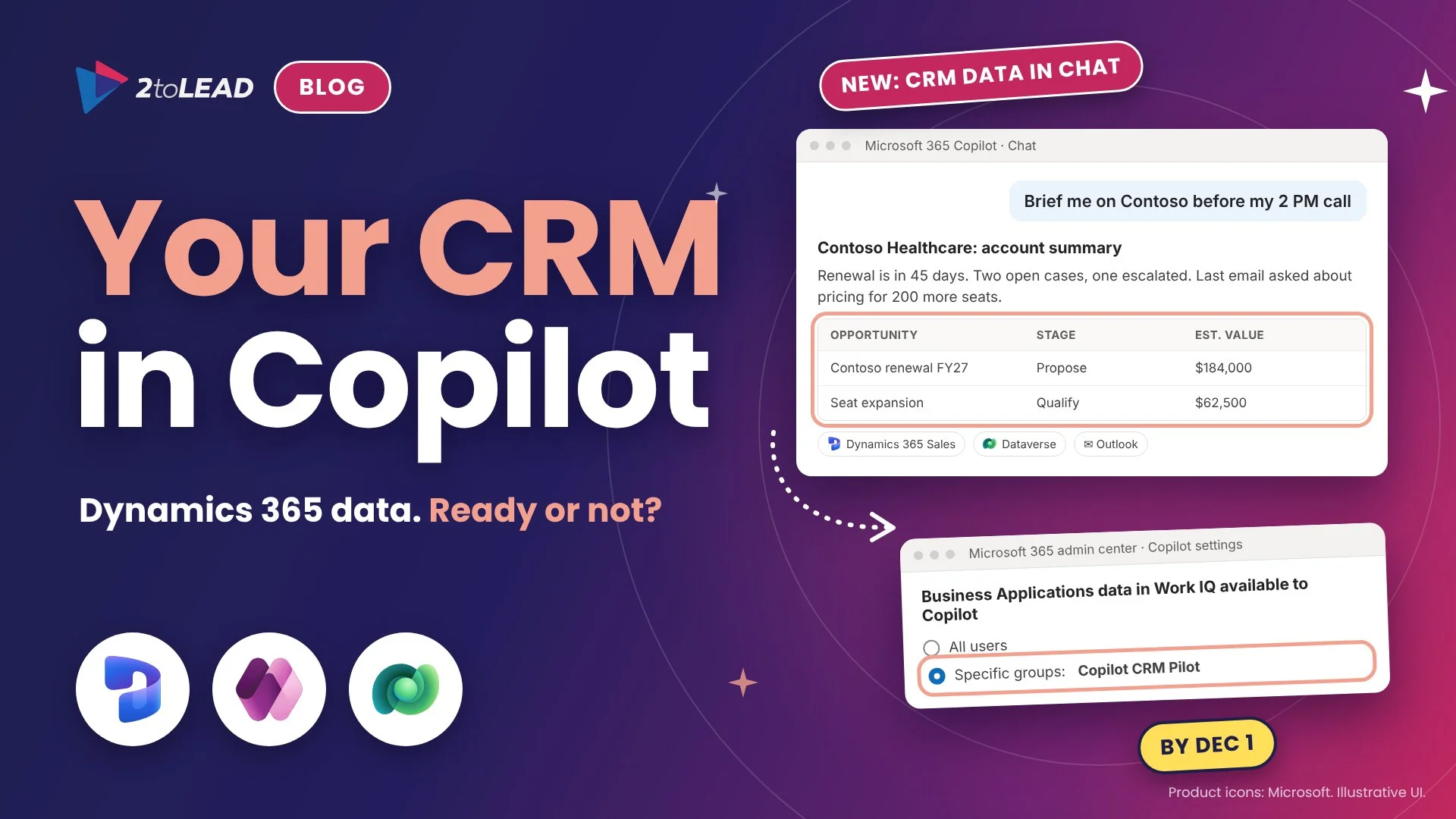
For two years the most common Copilot complaint we hear from sales and service leaders is simple: “It knows my email, but it does not know my customers.” That gap is closing. Microsoft has extended Work IQ, the intelligence layer behind Copilot, from productivity data into business applications. A seller can now ask Copilot Chat for everything about an account and get the emails, the proposal deck and the open opportunities from Dataverse in one answer.
The timing matters. The feature is in preview today, Microsoft says the separate Dataverse intelligence service will no longer be available soon, and between January and March 2027 new Microsoft 365 Copilot Business licenses bought through CSP switch on usage-based billing by default. That gives IT leaders a short window to decide who gets access, which data is in scope and how spend will be governed. This guide explains what changed, what it means for CIOs, CHROs and IT leaders, and a seven-step plan to pilot it with control.
Business Applications in Work IQ lets Copilot, Copilot Cowork and your agents discover, read and act on Dataverse data alongside Microsoft Graph content, while each application keeps its own data model, permissions and governance. Here is the short version, based on Microsoft’s official Business Applications in Work IQ documentation.
Swipe horizontally to view each change, its status and what it means.
| Change | Status | What it means for you |
|---|---|---|
| Business Applications in Work IQ: Copilot Chat can query, summarize and analyze Dataverse data alongside email, files and meetings | Public preview | Account, case and opportunity records can appear in everyday Copilot answers. Nothing is shared until admins turn it on. |
| Supported systems of record: Dynamics 365 Sales, Dynamics 365 Customer Service and Power Apps model-driven apps | Public preview | Start with one app whose data is clean and whose security roles you trust. |
| Copilot Cowork plugin and Work IQ MCP tools | Public preview | Agents can read and act on business records, not just answer questions, so approval and audit design matter. |
| Agent Builder, Copilot Studio and coding agents can use the same business context | Public preview | Define business skills once and reuse them, instead of rebuilding context in every agent. |
| Dataverse intelligence folds into Work IQ | Separate service retiring soon | Anything you piloted on Dataverse intelligence should move to Business Applications in Work IQ. |
| Tenant control: Business Applications data in Work IQ available to Copilot, for all users or specific Entra groups | Available in the Microsoft 365 admin center | Scope the pilot to a security group. This is your main on and off switch. |
| Dataverse search indexing powers the answers | Required per environment | Indexing can increase Dataverse capacity use. Check capacity before you enable it broadly. |
Two capabilities sit underneath the experience. Business skills let you define reusable business context, such as how your organization qualifies a lead or escalates a case, once for every agent. The Dataverse semantic model gives Copilot a shared, business-aware understanding of your tables and relationships, so “my top accounts” means the same thing in every answer.
It matters because it moves Copilot from summarizing documents to answering questions about customers, cases and revenue, which is where the measurable value has always been. It also means your Dataverse security model now shapes what Copilot says, not just what a form displays.
For CIOs, the question is readiness: are security roles, business units and field security tight enough that a natural-language question cannot surface records people technically have access to but never looked at? For CHROs, it is trust and workload: if HR case management or employee services run on Dataverse, those tables need a deliberate in or out decision. For IT leaders, it is cost and capacity: Dataverse search indexing increases capacity use, and agentic actions in Cowork bring consumption costs that need a policy.
Nonprofit: many nonprofits run donor and program data on Dataverse through Dynamics 365 or Power Apps. Keep donor and beneficiary tables out of the first pilot, and start with a program or volunteer app where the data is low risk and the time savings are easy to see.
Education: student information, advising and admissions apps built on Power Apps often have broad maker-era security roles. Audit those roles before any staff group gets Copilot access to the environment, and keep student records out of scope until the audit is done.
Government: check feature availability for your cloud before planning. In GCC and GCC High, some Copilot capabilities in Dynamics 365 need admins to install apps or enable Bing search and data movement explicitly, so confirm each setting against your data residency rules.
Work through seven steps over about five weeks: pick the right environment, fix permissions, turn on settings for a small group, measure, then decide. Steps 1 to 4 come first, well before usage-based billing becomes the default.
Save this checklist. Every setting must be on before Copilot can use Dataverse data, which also makes it a reliable way to switch the pilot off.
Swipe horizontally to view each setting, where it lives and who owns it.
| Setting | Where | Owner |
|---|---|---|
| Business Applications data in Work IQ available to Copilot (all users or specific groups) | Microsoft 365 admin center, Copilot settings | AI administrator or Global administrator |
| Copilot enabled for the environment | Power Platform admin center, environment features | Power Platform administrator |
| Dataverse search set to On or Default | Power Platform admin center, environment features | Power Platform administrator |
| Allow data availability in Microsoft Copilot | Power Platform admin center, environment features | Power Platform administrator |
| Search for records in Microsoft 365 apps | Power Platform admin center, environment features | Power Platform administrator |
| Tables included in search for each model-driven app | App settings in Power Apps | App owner with Power Platform administrator |
If you already restricted Fabric IQ from Copilot for Power BI, use the same decision record here: who approved the data source, for which group and when it will be reviewed.
Measure time returned on one recurring business question before and after the pilot, then compare that value with the licenses, credits and Dataverse capacity it consumes. A single well-chosen workflow tells you more than a usage dashboard.
Here is a simple worked example with illustrative numbers. Replace them with your own.
Track two quality measures alongside time: the share of answers users rate as correct, and the number of answers that surfaced a record the user should not have seen. The first should rise each week. The second should be zero. For a fuller scorecard, see our guide to Copilot adoption metrics that prove value.
These four questions come up in almost every briefing on this change.
No. Business Applications in Work IQ is in public preview. Preview features are provided as is, are subject to supplemental terms and can change, so use a scoped pilot on real but non-critical work rather than a full rollout.
Copilot works within each user’s existing Dataverse permissions, so it does not grant new access. It does make existing access far easier to use, which means broad security roles and stale business unit assignments become visible quickly. Review roles before you widen the pilot.
Microsoft documents that the full Work IQ experience needs a Microsoft 365 Copilot license. Inside Dynamics 365 apps, users also need a Dynamics 365 Enterprise or Premium license, and inside Power Apps they need a Power Apps premium license. Check the Work IQ licensing requirements for consumption costs before you scale.
Microsoft has folded Dataverse intelligence into Business Applications in Work IQ and says the separate service will no longer be available soon. Your environment settings and business context carry the same intent, so plan to move pilots to Work IQ now rather than after the service ends.
2toLead helps organizations across nonprofit, education, government, healthcare, financial services and professional services turn Microsoft 365 and Power Platform changes into governed, measurable outcomes. In a fixed-scope, three-week Work IQ Business Data Readiness Sprint, our Microsoft MVP team will:
Find more practical guidance on the 2toLead Insights hub, or book a Work IQ Business Data Readiness Sprint.
No hype. Just practical, governed AI that actually gets adopted.
Copilot licences bought, usage flat, ROI unproven? Three ways we help:
A global nonprofit turned Copilot licences into 1,115.6 hours saved and $83.7K in productivity value.
Read the case study →Copilot can surface what people shouldn't see. Three ways we help:
A professional organization built a Purview-based foundation for secure AI adoption with 2toLead.
Read the case study →


Join Our Newsletter